
Custom medal buyer guide
How to approve a custom medal design proof before mold making
The proof is more than a good-looking rendering. It is the production instruction the factory will follow. These 12 checks help you approve the right version before tooling begins.

Approve a custom medal proof only after the artwork and written quotation tell the same story: exact file version, front and back, dimensions, wording, relief, finish, colors, attachment, ribbon and packaging. Name the approved version in writing before authorizing mold making.
What the proof controls
One approval connects the quotation to production.
Review the proof beside the quotation, purchase order and your original files. A detail is not safely approved if it appears in only one place or is described differently in two documents.
Your source files
Logo, text, dates, colors and intended use.
Written quotation
Size, material, process, finish, accessories, quantity and packing.
Numbered proof
The controlled drawing that combines those choices.
Written approval
Authorization for the factory to proceed with the named version.
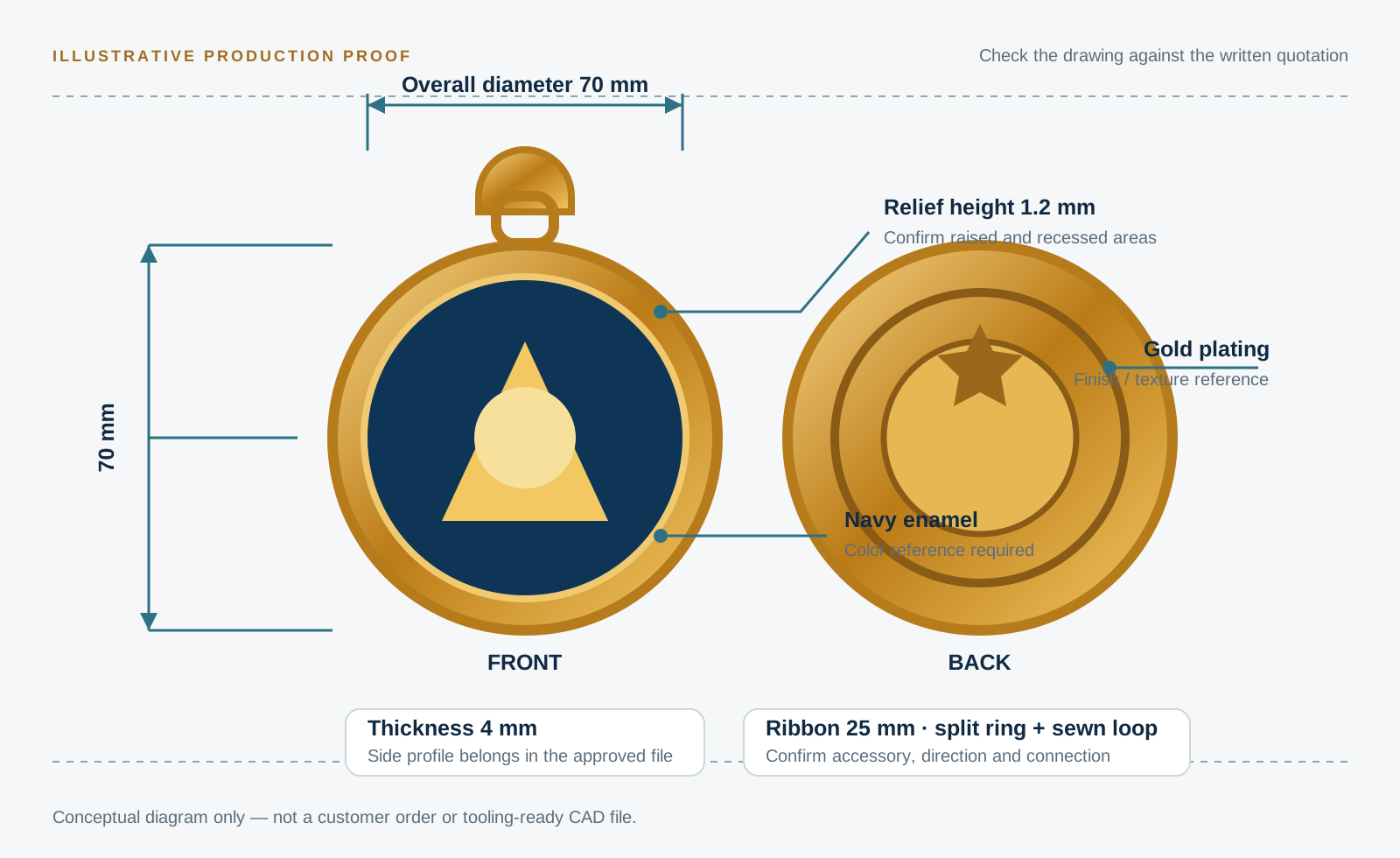
12 checks before tooling
Read the proof like a production document.
Zoom in, compare it with your own brief and ask for a revision wherever the answer is unclear.
- 01
Exact file and revision
Confirm the proof number, date and filename. Delete or archive older versions so nobody produces from the wrong file.
- 02
Overall size and thickness
Check width, height, diameter and thickness in millimetres. For an irregular shape, identify which points define the stated size.
- 03
Front, back and orientation
Confirm both sides, which way the reverse faces, and how the loop or ribbon aligns when the medal hangs.
- 04
Every word and number
Proofread names, dates, distances, ranks and punctuation character by character. The factory cannot infer the intended spelling.
- 05
Logo and fine detail
Check the correct logo version and whether thin lines, tiny gaps or small text need simplifying for metal production.
- 06
Raised, recessed and cut-out areas
Make sure 2D or 3D relief, recessed fields, holes and open spaces are clearly marked—not left to visual guesswork.
- 07
Metal finish
Name the plating and surface treatment: polished gold, antique silver, matte nickel, dual finish or another agreed reference.
- 08
Colors and color process
Match each area to the agreed reference and state whether it uses enamel, printing or another process. A screen preview is not a physical color standard.
- 09
Loop and hardware
Confirm the loop shape and position, jump ring, swivel hook, clasp or other connection, including its finish.
- 10
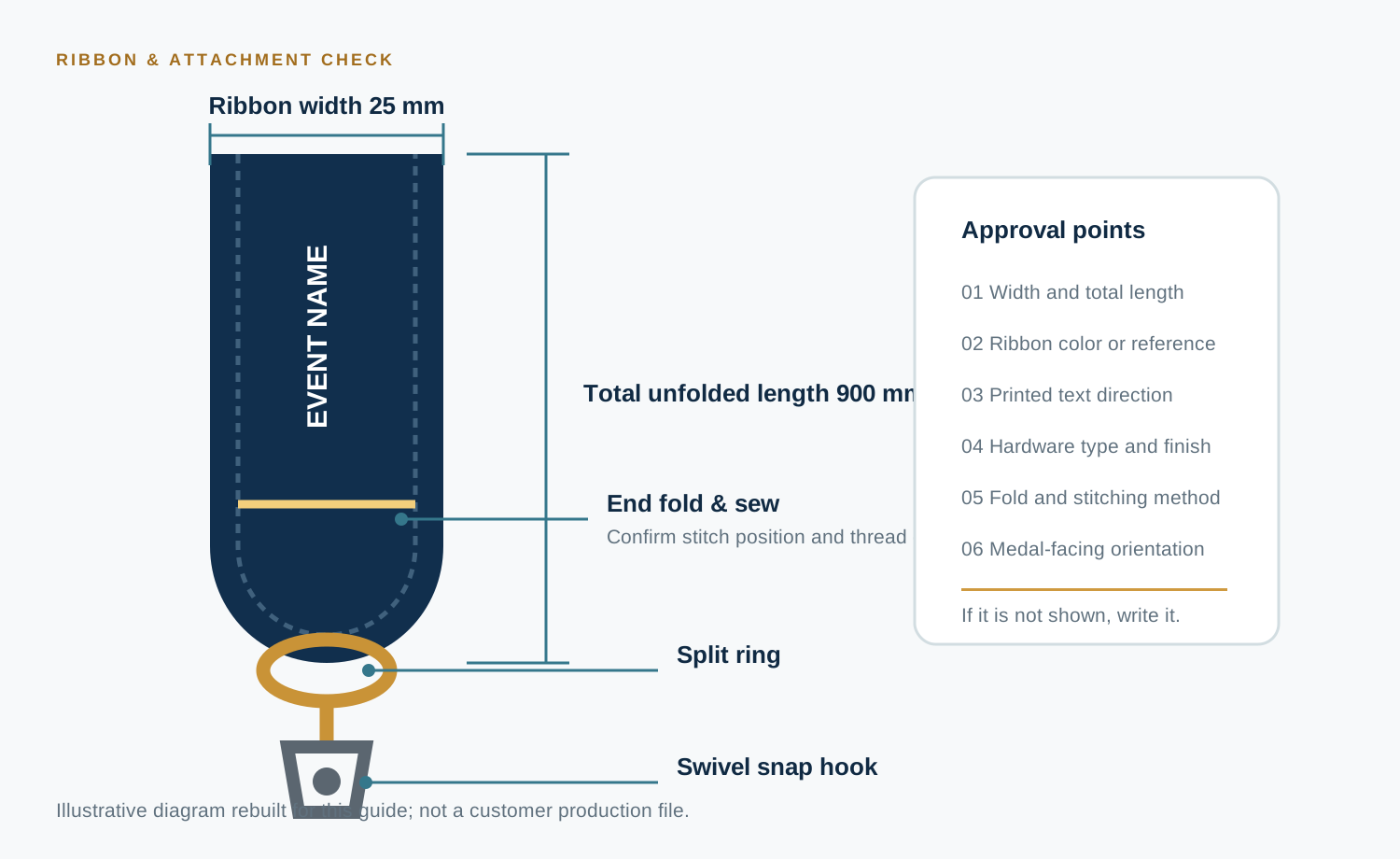
Ribbon specification
Check width, total length, color, printed text direction, stitching and the way it connects to the medal.
- 11
Packaging
Confirm individual bag, presentation box, backing card, labels and any assembly that the quotation includes.
- 12
Open points and authority
List anything still pending. Identify who on your team has authority to release the proof for mold making.
Accessories are specifications
The medal and ribbon must be approved as one assembly.
A correct metal part can still hang backwards, twist or arrive with the wrong hardware if the accessory details are vague. Put the ribbon and connection method in the controlled record.
Actual-size review
Print the medal at 100% scale.
Large artwork on a monitor can make small lettering and narrow gaps look safer than they are. Print the proof at actual size, cut out the outline and hold it. Check readability, proportions and the size of the loop against the real use.
Before trusting the print, measure the drawing's scale bar with a physical ruler. Printer settings such as “fit to page” can change the size.
Quick check: if the 100 mm scale bar does not measure 100 mm on paper, the medal is not being shown at actual size.
Written authorization
“Looks good” leaves too much open.
Name the exact version and say what happens next. Keep the approval in the same email or message thread as the proof.
Copyable approval wording“We approve custom medal proof [file name / version / date] for mold making. We have checked the front and back artwork, wording, dimensions, relief, finish, colors, loop, ribbon, accessories and packaging against quotation [number]. Please use this approved version for production. Any later change must be confirmed in writing before work continues.”
Revisions after approval
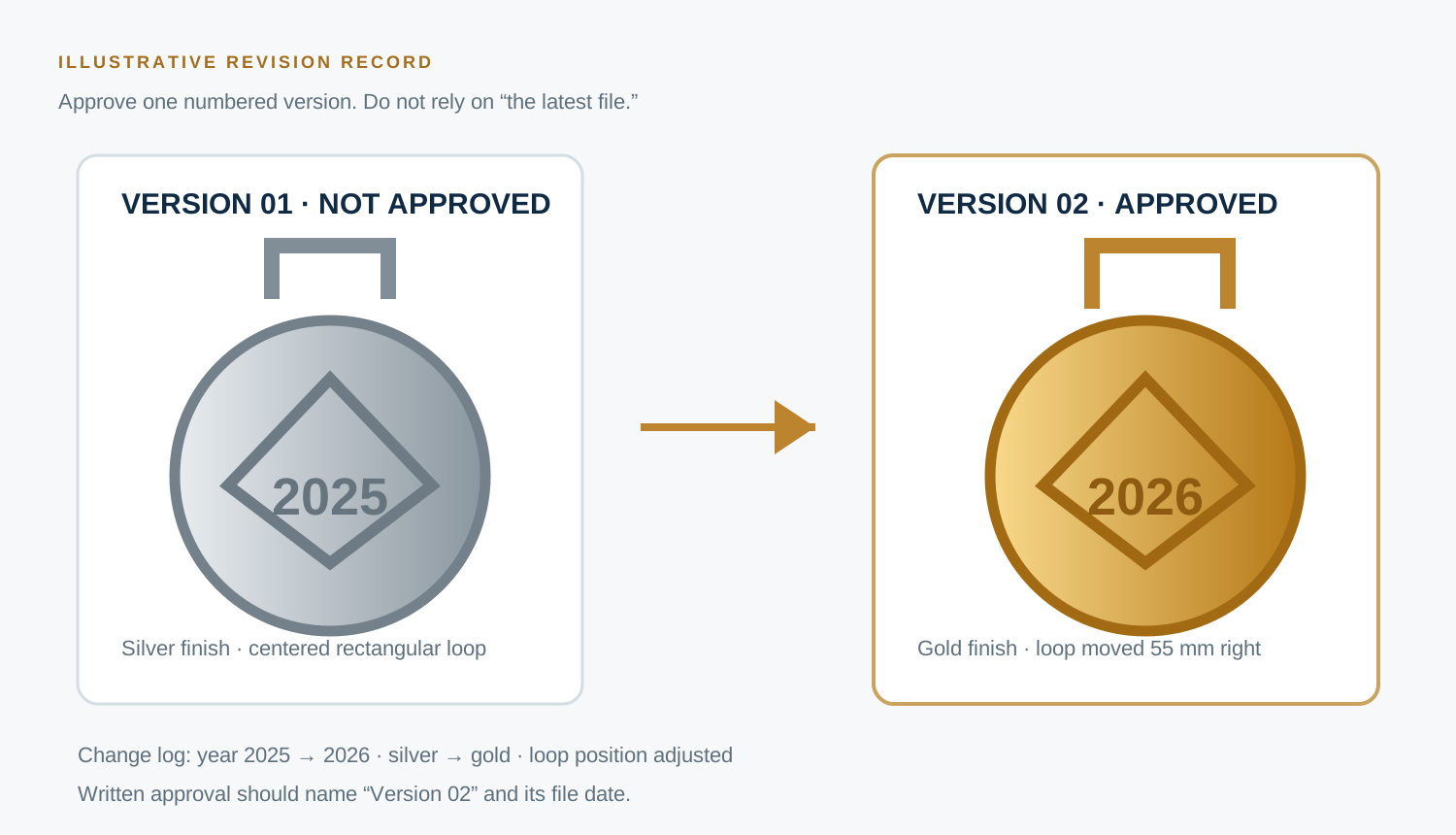
Every change needs a new controlled version.
Do not edit the old file silently. The revised proof should show what changed, carry a new version number and receive a new written approval.
Two different approvals
A digital proof and a physical sample answer different questions.
| Checkpoint | What it can confirm | What it cannot fully confirm |
|---|---|---|
| Digital design proof | Layout, dimensions, wording, front and back, intended relief, finish, color placement, ribbon and packaging specification. | Actual weight, hand feel, real plating appearance, surface texture, precise physical color, edge feel and assembled performance. |
| Physical sample | The real product's size, weight, finish, color appearance, relief, edges, hardware, ribbon and packaging assembly. | Automatic approval of every piece in the bulk batch. Bulk goods still need an agreed inspection standard. |
For a high-risk, high-value or technically unusual order, decide during quotation whether a physical sample is needed. Read our physical sample decision guide.
Buyer questions
Proof approval FAQ
Can I approve the proof by saying “looks good”?
A short reply can be misread. Use the exact proof version and name the specification groups you checked. State clearly whether you authorize mold making.
Should the proof match the quotation exactly?
Yes. If the drawing and quotation conflict, stop and resolve the difference in writing. The final controlled record should identify one agreed specification.
Is the color on my screen the final physical color?
No. Screens, lighting, plating and enamel can change appearance. Use an agreed color reference and discuss whether a physical sample is needed when color is critical.
What if I notice an error after approval?
Contact the factory immediately. Request a revised version and ask whether tooling or production has started, then confirm any cost and schedule effect before work continues.
Before you press approve
One clear version is cheaper than one unclear mold.
Send your artwork, target size, quantity, finish, colors, ribbon and delivery needs. The Oasis Metal team can turn those choices into a numbered production proof for your review.
Request a medal proof and quote